Mar 13, 2026
10 min read

kyomi
Software Engineer

Conventions must be enforced
How Conventions Prevent Slowdowns
The first thing that should be noted when we talk about software engineering is that it depends on people, and as people, each person has their own preferences, tastes, habits, and quirks. And when we talk about code, each person has their own style for writing, organizing, and structuring it. If you give the same problem to ten developers, even assuming they all have the same level of experience, it is practically impossible to get ten pieces of code that are exactly the same, with the same variable names, the same semicolons, the same structure, etc. Some will be more readable, others will prioritize performance, others will be more verbose, others more concise, and so on. This is inevitable, it is an intrinsic part of human nature. Every person is inherently different.
When you have a development team, conflicts around problem-solving style and ways of writing and structuring code are extremely common. Usually, in new projects, it is common for the team to disagree even on the stack to use, which frameworks, libraries, and so on. In those moments, someone with a strong leadership role is needed, someone capable of making technical decisions and defining guidelines so the whole team can move forward. Focus on these words: strong leadership role and move forward. A senior who is soft, avoids making difficult decisions (possibly for fear of exposing themselves to conflict), and who does not have a clear vision of what is best for the project, by definition, should not consider themselves a senior. They may be a good developer, but not a good leader. A developer's level is not defined only by technical skills, but also by leadership skills and better decision-making.
I am currently working at Caixa Economica Federal. I have been involved in about four or five different systems, working with legacy code, new projects, Java, C#, JSP, Angular, etc. In new projects, where the team is small and the codebase is not that large yet, it is easier to impose rules and conventions, easy to convince the team to follow a standard, and to maintain code consistency. However, in legacy projects, where the codebase reaches millions of lines of code, the team is considerably large, and the code is quite messy because it has passed through the hands of dozens or hundreds of developers, it is very difficult to impose rules.
When you try to make any code improvement, refactoring, or even add a new feature, you will likely spend most of your time reading code and trying to understand what it does. Nowadays, with the advancement of AI and analysis tools, this can be a little easier, but it is still an extremely slow process, since the AI would need to read many code snippets, understand the context, and only then be able to provide a useful answer, spending tokens and wasting the API monthly quota. Keeping code clean, organized, consistent, well documented, and with good conventions speeds up the process of reading and understanding code, which in turn accelerates the development process as a whole. Messy code slows down development, whether it is done by an AI or by a human.
Programmers Are Lazy
Most programmers are lazy. Most do not care about writing clean, organized code, and do not care about writing (or updating) documentation or tests. A large portion only likes the "cool part," which is writing code and seeing it work somehow. Learn one thing: you never write code for yourself, you write code for other people to read. If only you read the code, it is a strong sign that what you are doing is useless and without value. Even this blog of mine, which is small and personal, I keep a test suite and try to follow good development practices, because I know that after some time, when I read this code again, I will have to understand what I did, and if the code is messy, disorganized, and hard to understand, I will have a lot of work to understand what I myself did.
Going back to the part about making useless and valueless code. Let's say you moved past that stage and built something that actually adds value to some people's lives. At that moment, demand is created for your solution, and the forecast is that more people will start using what you built. At that point, it will be necessary to hire more developers to maintain and evolve the code. If the code is messy, the development team's performance will drop drastically.
Conventions Must Be Granular
The advantage of being a developer in modern times is that today every minimally serious programming language has some automatic formatting, linting, and static analysis tool. For Python we have Ruff, for JavaScript we have ESLint, for Java we have Checkstyle, and for C# we have StyleCop. These tools are designed not to be overly opinionated and to be easily configurable, so that it is possible to enforce a standard that the team is comfortable adopting. Ideally, these tools should be configured to be as strict as possible, so that code must be 100% compliant with the rules to be accepted. But then we hit the laziness problem. Nobody wants to remember to run linting and formatting every time they make a commit or every time they open a pull request. One possible solution is to configure CI/CD to run linting and formatting and reject the pull request if the code does not comply with the adopted standards.
This is one of the safeguards I recommend adding to any software, but I personally find it annoying to commit and only then discover that the code I wrote was not aligned with the standards adopted by the team. But I also do not want to remember to run my linter before every commit. The solution to this problem lives inside Git and is called Git Hooks. The idea is to keep rules as close as possible to the developer's machine, in a granular way, but at the same time in an automatic way, so the developer does not need to worry about following rules and the process remains as smooth as possible.
Git Hooks
Many people do not know this, but Git has events (also called
hooks). These events are triggered at specific moments in Git's lifecycle,
such as before making a commit, before or after a push, etc. Every time an
event happens, Git executes an executable script that can be written in any
programming language (determined by the
shebang at the top of the file)
and is located in the repository's .git/hooks folder. These scripts can be
used to automate tasks, such as running linting and code formatting before a
commit, or running tests before a push. Some examples of events are:
There are many other events you can use, check the documentation for details.
Git Hook Managers
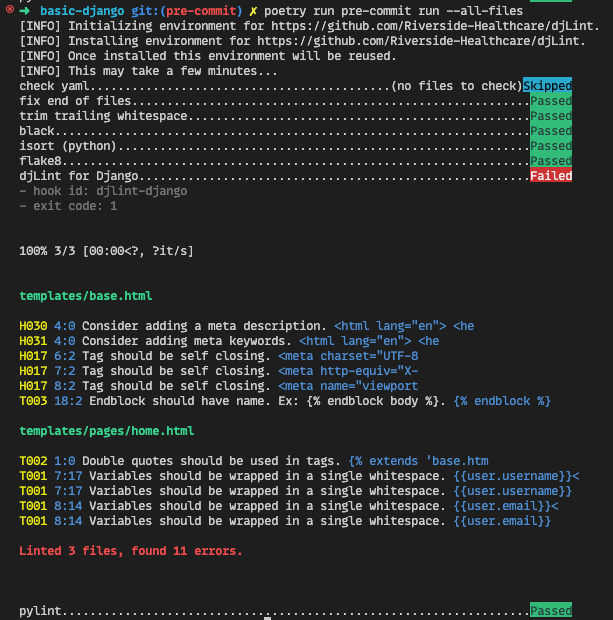
The problem with Git Hooks is that they are not versioned, meaning each developer needs to configure hooks manually on their machine, which can be a boring and error-prone process. To solve this problem, there are tools called Git Hook managers, which are libraries that allow hooks to be versioned and shared among team members. Some examples of Git Hook managers are Husky for JavaScript and pre-commit for Python. These tools let you configure hooks in a configuration file, and they take care of installing hooks on the developer's machine automatically, ensuring that all team members use the same hooks and follow the same rules.
My Codebase Is Too Big, I Can't Enforce Conventions
You don't need to enforce conventions on the entire codebase at once. You can start enforcing conventions on new code and gradually refactor old code to comply with the standards. This way, you can improve code quality over time without needing to do a massive refactor all at once, which can be risky and time-consuming. Small steps can lead to big improvements in the long run, and it is better to have some code following conventions than to have all code messy and disorganized.
- english
- software engineering
- code quality